

Xsortex HUB
LCD 16x2 (1602) with I2C Module – Pre-Soldered
LCD 16x2 (1602) with I2C Module – Pre-Soldered
Couldn't load pickup availability
- Technical Support 24/7
- Same Day or 1-Day Shipping near Navi Mumbai
- Free shipping on Orders Above Rs 300/-
 Cash on Delivery available
- Original Product guarantee
- 7-Day Easy Return/Exchange
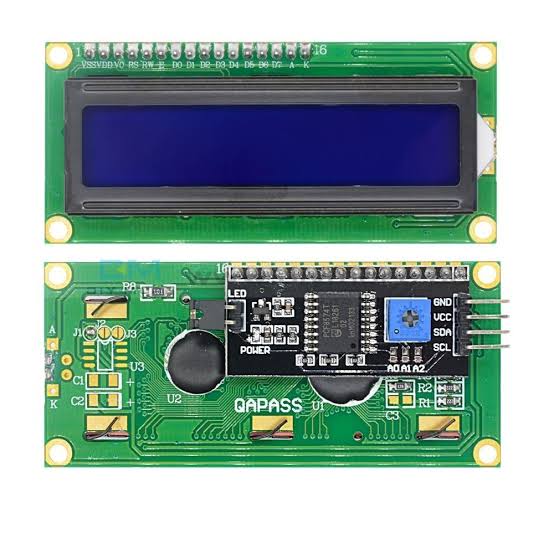
LCD 16x2 (1602) with I2C Module – Pre-Soldered
The LCD 16x2 (1602) with I2C Module – Pre-Soldered is the easiest way to add a text display to any microcontroller project. You get the classic 16×2 character LCD (HD44780 compatible) with an I2C backpack module (PCF8574) already soldered to the back, so the whole display runs on just 4 wires (GND, VCC, SDA, SCL) instead of a 16-pin parallel connection. No soldering and no extra adapter needed, just plug in jumper wires and start printing text.
Key Specifications
- Display Format: 16 characters × 2 rows (32 characters total)
- Controller: HD44780 (or compatible)
- Interface: I2C via PCF8574 backpack, pre-soldered and ready to use
- I2C Address: commonly 0x27 or 0x3F (confirm yours in seconds with an I2C scanner sketch)
- Operating Voltage: 5V DC
- Connections: 4-pin header (GND, VCC, SDA, SCL)
- Backlight: LED backlight with on-board control jumper
- Contrast: adjustable via on-board potentiometer
- Character Size: 5×8 dot matrix per character
Compatibility & Use Cases
Works with Arduino UNO, Nano and Mega, ESP32, NodeMCU ESP8266, and Raspberry Pi using the popular LiquidCrystal_I2C library. On an Arduino UNO, connect SDA to A4 and SCL to A5 and you can print your first message in minutes. For 3.3V boards such as ESP32 or ESP8266, verify logic-level compatibility or use a level shifter. Common applications include:
- Sensor data readouts (temperature, humidity, distance, gas levels)
- Weather station and IoT dashboard displays
- RFID access control and security system status screens
- Menu and settings interfaces for embedded projects
- STEM, robotics and beginner electronics builds
What You Get
- 1 × 16x2 (1602) Character LCD Display with pre-soldered I2C module
Frequently Asked Questions
Is any soldering required?
No. The I2C module is already soldered to the LCD, so you can connect it straight to your development board with jumper wires.
What is the I2C address?
Most modules ship configured at 0x27 or 0x3F. Run a simple I2C scanner sketch to confirm the address of your unit before uploading your project code.
Which library should I use?
Use the LiquidCrystal_I2C library for Arduino and ESP boards, or any HD44780-compatible I2C library on Raspberry Pi.
Order now from Xsortex HUB and get fast delivery across India.
- Choosing a selection results in a full page refresh.
- Opens in a new window.